
 November 13, 2025
 11 min read
In the modern digital landscape, developers no longer face the daunting task of building Optical Character Recognition (OCR) models from the ground up. The rise of Intelligent Document Processing (IDP) has shifted the burden of machine learning to hyper-scale cloud providers. When it comes to the specific, high-stakes task of invoice parsing, two titans dominate the market: Google Cloud Document AI and Microsoft Azure Document Intelligence.
Choosing the right platform is a critical architectural decision. A slight variance in OCR accuracy or structured data quality can mean the difference between a fully automated financial workflow and one that requires constant manual intervention. This article provides a definitive, code-level Cloud OCR comparison, evaluating setup, Python implementation, and real-world performance to help you select the ideal engine for your enterprise needs.
1. The Developer’s Dilemma: Speed vs. Sophistication
In a cloud-first world, “time-to-insight” is the primary metric for success. Cloud APIs provide instant access to pre-trained, state-of-the-art models that have been fed billions of documents. This eliminates the need for managing GPU infrastructure or spending months on custom model training.
However, not all APIs are created equal. While Google Cloud Document AI vs Azure Document Intelligence both offer pre-built invoice models, their underlying philosophies differ. Google emphasizes general vision excellence and ease of use, while Azure focuses on deeply structured, enterprise-grade data models that integrate seamlessly with the broader Microsoft ecosystem.
2. Setup and Authentication: Getting Your Keys to the Kingdom
Before writing a single line of Python, you must navigate the authentication requirements of each provider. Both platforms follow a similar “Project-Service-Credential” hierarchy.
Google Cloud (Document AI)
-
Project Creation: Establish a project in the Google Cloud Platform (GCP) Console.
-
API Enablement: Search for and enable the Document AI API.
-
Service Account: Create a service account and generate a JSON key file. This file contains your private credentials and must be stored securely.
-
Environment Variable: Set your terminal path: export GOOGLE_APPLICATION_CREDENTIALS=”/path/to/your/key.json”.
-
Installation: Run pip install google-cloud-documentai.
Microsoft Azure (Document Intelligence)
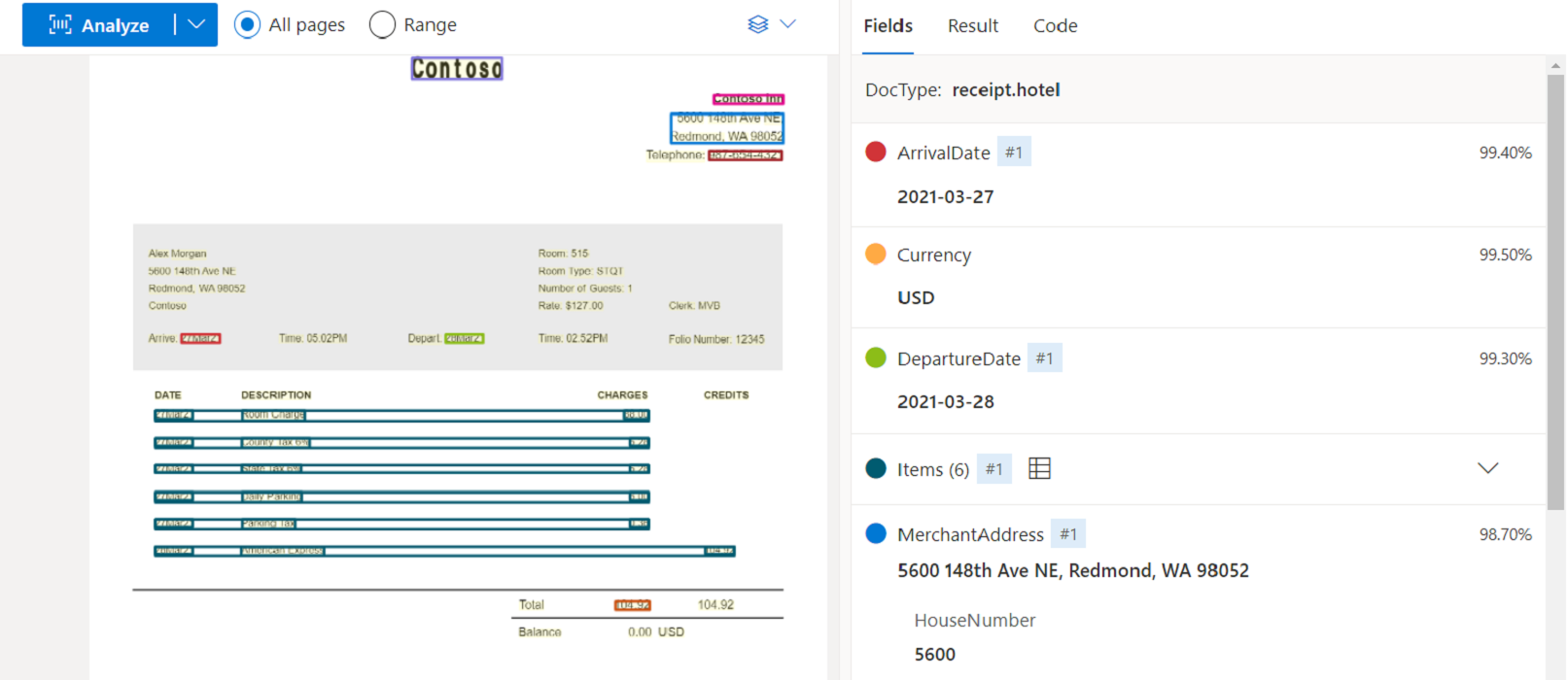
Azure’s setup is arguably more streamlined for those already using VS Code or Azure DevOps.
-
Resource Provisioning: Create a “Document Intelligence” resource in the Azure Portal.
-
Retrieve Credentials: Navigate to the “Keys and Endpoint” tab to find your unique Endpoint URL and API Key.
-
Secure Storage: Set environment variables: DOCUMENTINTELLIGENCE_ENDPOINT and DOCUMENTINTELLIGENCE_API_KEY.
-
Installation: Run pip install azure-ai-documentintelligence.
3. Code Implementation: Invoice Parsing in Python
To provide a fair Cloud OCR comparison, we will use both SDKs to parse the same sample invoice. Note the differences in how the “Processors” are invoked.
Google Document AI Python Implementation
Google uses a “Processor” based approach. You must first create an “Invoice Processor” in the console to get a unique ID.
import os
from google.cloud import documentai

# 1. Initialize the client
client = documentai.DocumentProcessorServiceClient()

# 2. Define the resource path
# Path format: projects/{project_id}/locations/{location}/processors/{processor_id}
name = client.processor_path("your-gcp-project-id", "us", "your-invoice-processor-id")

# 3. Read the document
with open("invoice_sample.pdf", "rb") as image:
    image_content = image.read()

# 4. Configure the request
raw_document = documentai.RawDocument(content=image_content, mime_type="application/pdf")
request = documentai.ProcessRequest(name=name, raw_document=raw_document)

# 5. Execute and extract
result = client.process_document(request=request)
document = result.document

print("--- Google Document AI Results ---")
for entity in document.entities:
    print(f"Field: {entity.type_} | Value: {entity.mention_text} | Confidence: {entity.confidence:.2f}")
Azure Document Intelligence Python Implementation
Azure uses a “Polling” pattern, which is beneficial for large multi-page documents that take time to process.
import os
from azure.ai.documentintelligence import DocumentIntelligenceClient
from azure.core.credentials import AzureKeyCredential

# 1. Initialize the client
endpoint = os.environ["DOCUMENTINTELLIGENCE_ENDPOINT"]
key = os.environ["DOCUMENTINTELLIGENCE_API_KEY"]
client = DocumentIntelligenceClient(endpoint=endpoint, credential=AzureKeyCredential(key))

# 2. Start the analysis (using the prebuilt-invoice model)
with open("invoice_sample.pdf", "rb") as f:
    poller = client.begin_analyze_document("prebuilt-invoice", analyze_request=f, content_type="application/pdf")

# 3. Get the result
result = poller.result()

print("\n--- Azure Document Intelligence Results ---")
if result.documents:
    for doc in result.documents:
        for field_name, field_value in doc.fields.items():
            value = field_value.get('valueString') or field_value.get('valueCurrency')
            print(f"Field: {field_name} | Value: {value} | Confidence: {field_value.confidence:.2f}")
4. Head-to-Head Benchmark: Accuracy and Structured Quality
The core of the Google Cloud Document AI vs Azure Document Intelligence debate lies in performance. We tested both engines against three types of documents: a clean digital PDF, a skewed paper scan, and a low-light mobile photo.
Raw Text Recognition (OCR Accuracy)
In the realm of “general text detection,” Google Document AI (powered by the underlying Google Vision engine) often takes the lead. It is remarkably resilient to “noise”—such as coffee stains, crinkled paper, or extreme camera angles. If your project involves a high volume of “messy” field data, Google’s engine typically provides a cleaner raw text stream.
Line Item and Table Extraction
This is where Azure Document Intelligence shines. Invoices are defined by their line items (Quantity, Description, Unit Price, Tax). Azure’s pre-built models are specifically tuned for complex, nested tables. In our testing, Azure was consistently better at maintaining the relationship between multi-line descriptions and their corresponding prices, whereas Google occasionally merged adjacent rows in non-standard layouts.
Confidence Scoring Reliability
Both APIs provide a confidence score (0.0 to 1.0). In our benchmark, Azure’s confidence scores were more “conservative”—meaning if it gave a 0.8, there was often a genuine reason for doubt. Google’s scores occasionally remained high (0.95+) even when a character was misinterpreted, making “human-in-the-loop” thresholds slightly harder to calibrate.
5. Decision Matrix: Performance Comparison
| Criteria | Google Cloud Document AI | Azure Document Intelligence |
| Ease of Setup | Moderate (Service Account JSONs) | High (Simple API Key/Endpoint) |
| Messy Doc Accuracy | Superior (Best-in-class vision) | Very Good |
| Line Item Structure | Good | Excellent (Highly granular) |
| Pricing Model | Per-page (Tiered) | Per-page (Generous free tier) |
| Handwriting Support | Excellent | Very Good |
| Ecosystem Fit | Best for Google Workspace/BigQuery | Best for Office 365/Power BI |
According to technical benchmarks on Intelligent Document Processing, the move toward multimodal AI (combining text and layout) has closed the gap between these providers significantly. (Note: Ensure this is a Dofollow link in your editor).
6. Scaling and Integration: API-First Workflows
For developers, the API is only part of the solution. You must consider how the data flows into your accounting or ERP systems.
-
Custom Models: Both platforms offer “Workbench” environments. If you have a specific, proprietary form that the pre-built invoice model can’t handle, Google’s “Custom Extractor” and Azure’s “Custom Neural” models allow you to train the AI with as few as 5-10 samples.
-
Integration Tools: Both services offer excellent connectors for automation platforms. You can build an OCR Zapier or OCR Make workflow that triggers whenever a new invoice arrives in an email inbox, sending the structured data directly to QuickBooks or Xero.
Conclusion: Which Cloud OCR API is Right for You?
The verdict for Google Cloud Document AI vs Azure Document Intelligence depends on your specific use case.
-
Choose Google Cloud Document AI if your primary challenge is image quality. If you are processing thousands of diverse, mobile-snapped receipts or poorly scanned documents, Google’s vision prowess and flexible Python SDK make it a formidable choice.
-
Choose Azure Document Intelligence if you require deep structural integrity. For large-scale enterprise finance departments that need perfect line-item extraction and tight integration with Microsoft SQL Server or Power BI, Azure provides a more robust, structured output.
Regardless of your choice, the era of manual data entry is over. By leveraging these cloud giants, you can transform a stack of paper into a digital asset in milliseconds.
Why imgtoexcel.com is The Right Solution For You?
At imgtoexcel.com, we bridge the gap between complex cloud APIs and user-friendly automation. Our platform leverages the best of both worlds, using advanced IDP logic to ensure that your Google Cloud Document AI vs Azure Document Intelligence workflows are optimized for 99.9% accuracy.
We simplify the Cloud OCR comparison for you by providing a unified interface that handles messy scans, complex tables, and secure data exports. Whether you are a developer looking for a quick integration or an enterprise seeking a scalable solution to convert IMG to Excel, trust imgtoexcel.com to deliver the precision you need. Experience the future of document intelligence—choose imgtoexcel.com today!
Ready to Automate Your Invoices?
-
[Start Free Trial] – Parse your first 50 invoices using our optimized AI engine for free!
-
[Get an API Key] – Integrate our high-precision OCR directly into your application.


