
 March 19, 2026
 11 min read
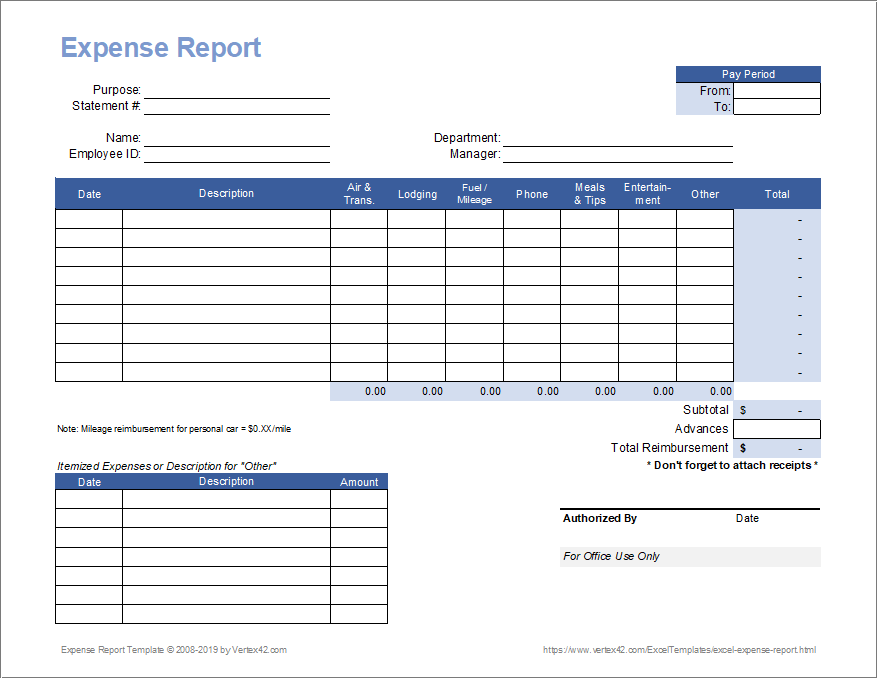
In the modern corporate landscape, financial velocity is the primary driver of competitive advantage. However, many finance departments remain throttled by the “shoebox bottleneck”—the manual processing of physical receipts and crumpled paper slips. Relying on staff to manually transpose data into a ledger is a structural risk that invites human error and slows down reimbursement cycles. To achieve true operational agility, forward-thinking enterprises are moving to convert expense report image to Excel, transforming “dark data” into structured, actionable digital assets.
By choosing to convert expense report image to Excel via intelligent automation, you eliminate the friction of manual entry and ensure that your financial records are 100% audit-ready. This guide explores the technical evolution of Optical Character Recognition (OCR) and provides a definitive roadmap to mastering the expense OCR tool workflow with surgical precision.
1. The Operational Crisis: The Real Cost of Manual Data Entry

Manual data entry is often referred to as the “silent killer” of productivity in the accounting office. For many businesses, the burden of transcribing data from multi-page invoices and small thermal-paper receipts is a significant drain on high-level human capital.
-
The Inaccuracy Risk: Human eyes are prone to fatigue, leading to “transposition errors” where digits are misread. A single mistake in an expense report can lead to incorrect tax filings or internal financial discrepancies.
-
Operational Latency: Manually typing an expense report takes an average of 20 minutes per employee. An AI-powered expense OCR tool can complete the task in under 10 seconds.
-
Data Silos: Information trapped in an image format is search-resistant. You cannot filter, sort, or perform compliance checks on a stack of photos until they are moved through an expense report image to Excel pipeline.
Utilizing an automated system ensures that your general ledger reflects reality with near-perfect precision, effectively eliminating the risks associated with manual handling.
2. The Core Technology: How AI and an Expense OCR Tool Power Data Extraction
To master this process, one must understand the shift from basic character recognition to Intelligent Document Processing (IDP).
Beyond Standard OCR
Traditional OCR simply identifies shapes. In 2026, a professional expense OCR tool utilizes deep learning neural networks to understand the context of a receipt. It recognizes that a specific 10-digit number near a logo is a “Tax ID,” while a value at the bottom of the page is the “Total Amount Due.” This contextual intelligence allows the system to convert expense report image to Excel without requiring rigid manual templates.
AI and Semantic Understanding
Advanced AI doesn’t just read text; it performs semantic mapping. It identifies the merchant name, the currency type, and the purchase date regardless of the receipt’s layout. This is why a professional expense OCR tool is essential for global companies—it can process diverse scripts and multi-currency documents simultaneously, ensuring the final expense report image to Excel export is perfectly structured.
3. The 5-Step Professional Workflow: From Image to Actionable Data
Mastering the expense report image to Excel workflow requires a logical and secure progression:
-
Image Capture: Using a smartphone or a flatbed scanner to capture high-resolution photos (300 DPI). Sharp images ensure the expense OCR tool achieves 99.9% accuracy.
-
Intelligent Upload: The files are ingested into a secure cloud environment. A professional platform uses AES-256 encryption to protect sensitive financial data.
-
Field Mapping & Extraction: The AI identifies “Key-Value Pairs.” It maps the data directly into columns like Date, Category, Vendor, and Amount.
-
Verification (Human-in-the-Loop): A brief review phase where a team member confirms any low-confidence characters, ensuring 100% precision before the final move to convert expense report image to Excel.
-
Structured Export: The data is generated as a clean .xlsx or .csv file, ready for instant integration into your primary accounting software.
4. Bridging the Gap: Moving to Full Accounting Automation
While a spreadsheet is a massive improvement over paper, the ultimate goal of an expense report image to Excel workflow is to act as a bridge to a wider automated ecosystem.
Once the data is in Excel, it can be seamlessly imported into ERP systems like QuickBooks, Xero, or SAP. This connectivity allows for “Automated Reconciliation,” where the computer automatically matches scanned receipts to bank statements. By utilizing an expense OCR tool, you remove the need for manual cross-referencing, ensuring that every cent is accounted for at the end of the month.
According to global standards for Internal Financial Control, maintaining a clear digital audit trail linked to the original source document is a primary driver of tax compliance.
5. Strategic Benefits: Accuracy, Integrity, and Scale
Implementing an expense report image to Excel strategy provides a measurable Return on Investment (ROI):
-
90% Reduction in Labor Time: Tasks that previously took hours are now completed in seconds.
-
Policy Compliance: An automated system can flag receipts that exceed company spending limits or identify duplicate entries instantly.
-
Real-Time Visibility: CFOs can see spending trends as they happen, rather than waiting for weeks to receive a manual expense report image to Excel summary.
-
Disaster Recovery: Digital files stored in the cloud are safe from physical damage, providing a permanent record for future audits.
6. Security and Compliance in Financial Data Extraction
Handling business finances is a heavy responsibility. When you use an expense OCR tool to convert expense report image to Excel, security must be your first priority.
-
Data Privacy: Professional platforms must follow GDPR and local data protection mandates.
-
No-Log Policy: Trustworthy providers like imgtoexcel.com implement a “zero-persistence” strategy, deleting your source images and final sheets immediately after the task is complete to prevent data leaks.
-
Audit Trails: Digital systems provide a transparent log of who accessed the data and when, offering far superior security to physical shoeboxes of paper.
7. Choosing the Right Solution for Your Business
Selecting an expense report image to Excel partner is a critical decision. When auditing a potential expense OCR tool, look for:
-
Accuracy Rates: Does it achieve 99% precision even on blurry images?
-
Integration Support: Can it connect directly with your existing ERP?
-
Scalability: Can it handle a 200% increase in transactions during peak travel seasons?
-
Mobile Agility: Does it offer a fast, reliable mobile app for employees on the road?
Conclusion: Lead the Digital Transformation in Finance
The era of manual data entry is over. Sticking to old, slow habits is a structural risk to your company’s efficiency and profitability. By choosing to convert expense report image to Excel, you empower your team to focus on strategic growth rather than administrative maintenance.
Stop letting your business intelligence stay trapped in a static picture. Use the power of a modern expense OCR tool today and watch your organizational velocity soar. Accuracy, speed, and security are finally within your reach.
Why imgtoexcel.com is The Right Solution For You?
At imgtoexcel.com, we provide the industry’s most accurate technology to convert expense report image to Excel. Our platform is specifically fine-tuned for the unique layouts of international receipts, travel invoices, and multi-page manifests.
We prioritize your security and ease of use, offering a high-speed expense OCR tool workflow that delivers 99.9% accuracy. Whether you are an independent accountant or a global CFO, trust imgtoexcel.com to deliver the structured digital intelligence you need to lead your market. Experience the future of document automation—choose imgtoexcel.com today!
Ready to Automate Your Expenses?
-
[Start Free Trial] – Convert your first 50 expense images for free!


