
 March 13, 2026
 11 min read
In the high-velocity global travel and finance sectors, organizational speed is the primary driver of competitive advantage. However, many enterprises remain throttled by the “analog bottleneck”—the manual transcription of sensitive travel documents. Relying on staff to type every detail from a passport into a database is a structural risk that invites human error and slows down customer onboarding. To achieve true operational agility, forward-thinking businesses are implementing Passport OCR Excel technology to transform static images into structured digital intelligence.
By choosing to convert passport image to Excel via intelligent automation, you eliminate the friction of manual entry and ensure that your data is 100% audit-ready. This guide explores the technical evolution of Optical Character Recognition (OCR) and provides a definitive roadmap to mastering the Passport OCR Excel workflow with surgical precision.
1. The Operational Crisis: The Cost of Manual Travel Data Entry

Manual data entry is the “silent killer” of productivity in hotels, banks, and travel agencies. When critical identity information is trapped in physical documents or static image files, your business faces three major liabilities:
-
The Inaccuracy Trap: Human eyes are prone to fatigue, leading to “transposition errors” in passport numbers or expiry dates. A single digit error can result in severe legal discrepancies or rejected travel bookings.
-
Onboarding Latency: Manually transcribing a passport takes an average of 3 to 5 minutes per client. A professional Passport OCR Excel tool can complete the task in under 3 seconds.
-
Data Silos: Information in an IMG format is search-resistant. You cannot filter, sort, or perform compliance checks on a stack of photos until they are moved into a structured spreadsheet.
Utilizing an automated system to convert passport image to Excel ensures that your database reflects reality with near-perfect precision, effectively eliminating the risks of manual handling.
2. Technology Behind Passport OCR Excel and Scanning
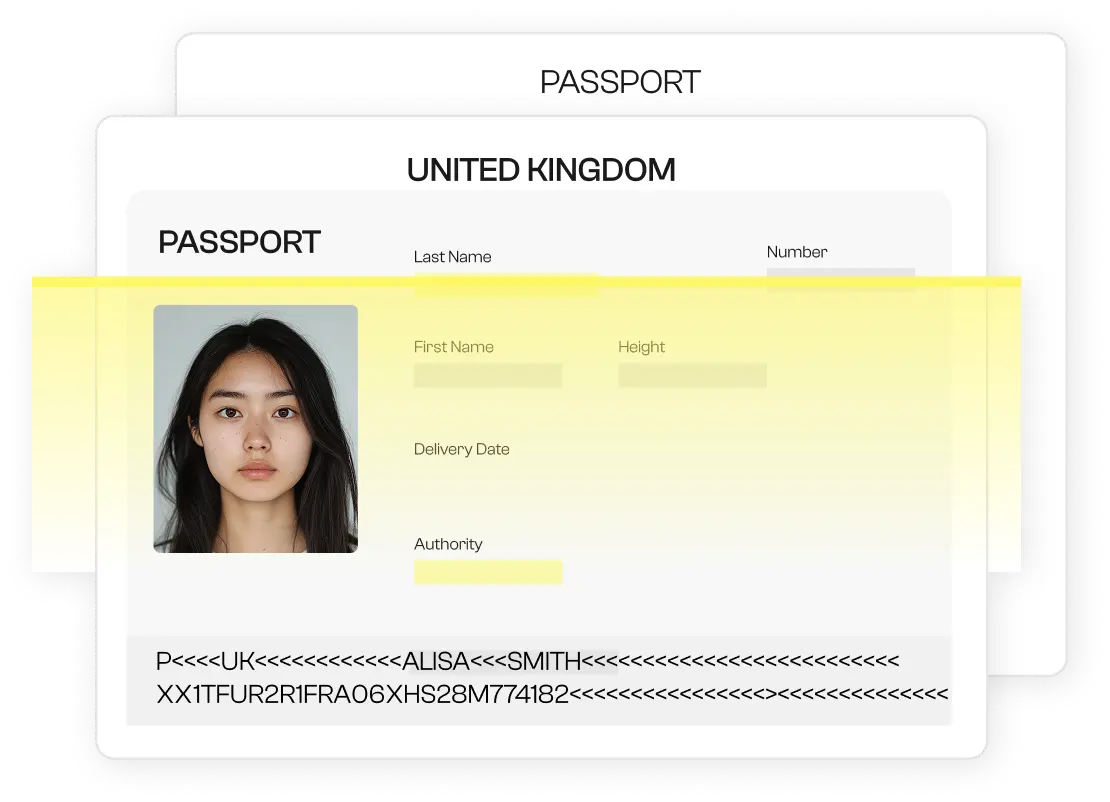
To master this process, one must understand the technical anatomy of a modern passport. Passports contain two distinct data areas: the Visual Inspection Zone (VIZ) and the Machine Readable Zone (MRZ).
The MRZ Extraction Advantage
The Machine Readable Zone is the section at the bottom of the identity page featuring alphanumeric characters and chevrons («). A professional Passport OCR Excel tool reads this zone first because it follows a standardized logic. The software identifies the 44-character strings instantly, extracting the document number, nationality, and date of birth with 100% reliability.
AI and Neural Networks
In 2026, Passport OCR Excel has moved beyond simple character matching. Modern AI utilizes deep learning to interpret the VIZ, which includes names and addresses that often use diverse fonts. High-end engines like imgtoexcel.com can read passports from over 190 countries, handling non-Latin scripts and complex layouts without requiring manual templates. This flexibility is what makes a professional engine superior to a basic office scanner.
3. The 4-Step Professional Workflow: From Photo to XLSX

Building an automated digital archive requires a logical, secure progression. Here is how to implement a high-speed Passport OCR Excel workflow:
Step 1: Intelligent Image Acquisition
Quality in equals quality out. For the best Passport image to Excel results, ensure the document is captured in a well-lit environment. High-contrast images (minimum 300 DPI) allow the AI to see the fine security micro-text without confusion.
Step 2: AI Pre-processing
The software performs “Deskewing” to straighten any tilted text and “Binarization” to sharpen the characters. This ensures that even a smartphone photo taken at an angle becomes a clear digital map for the Passport OCR Excel engine.
Step 3: Zonal Extraction and Mapping
The engine identifies the specific fields—Surname, Given Names, Passport Number, and Gender. It maps these unstructured image pixels into a structured digital format, ensuring that when you convert passport image to Excel, every piece of data lands in the correct column.
Step 4: Verification and Export
A professional workflow includes a brief “Human-in-the-Loop” stage. The software flags any “low-confidence” characters for quick verification. Once confirmed, you can export the data into .xlsx or .csv formats, ready for instant integration into your CRM or internal logs.
4. Scaling Your Data Tasks with Batch Processing
The primary difference between an average firm and an industry leader is scale. If you are managing an airport lounge, a large-scale bank branch, or a global travel group, you need a Passport OCR Excel solution that handles volume.
-
Batch Uploading: Upload hundreds of passport image to Excel files simultaneously. The system processes the queue in the background, allowing your staff to focus on high-value client interactions.
-
API-First Integration: For enterprises, connecting a Passport OCR Excel API directly to your website or mobile app allows for “Zero-Touch” data entry. When a customer uploads their document, the data flows directly into your system without human intervention.
5. Compliance and PII Security: The Non-Negotiable Pillar
Handling passports means managing highly sensitive Personally Identifiable Information (PII). When you convert passport image to Excel, security must be your first priority.
-
Global Privacy Standards: Professional platforms must adhere to GDPR (Europe), CCPA (California), and local data protection laws.
-
Data Encryption: All files processed through a Passport OCR Excel tool should be protected by AES-256 encryption.
-
The No-Log Policy: Trustworthy platforms like imgtoexcel.com use a “zero-persistence” strategy, deleting your source images and final sheets immediately after the task is complete to prevent data leaks.
According to the International Civil Aviation Organization (ICAO), standardizing how travel documents are read digitally is a critical component of global security.
6. Real-World Business Benefits: The ROI of Automation
Implementing a Passport OCR Excel strategy provides a measurable Return on Investment:
-
Drastic Error Reduction: Machine precision stops typos in document numbers that can lead to massive legal fines.
-
Unmatched Cost Efficiency: Reduce the number of administrative hours spent on paperwork by up to 90%.
-
Superior Customer Experience: Clients are impressed by a modern, professional check-in process that takes seconds instead of minutes.
-
Audit-Ready Integrity: Digital files are easier to search and share with regulatory bodies than boxes of physical paper.
7. Choosing the Right Passport Image to Excel Converter
Selecting a partner is a critical decision. When auditing a Passport OCR Excel tool, look for:
-
Accuracy Rates: Does it achieve 99.9% precision on MRZ data?
-
Global Support: Does it recognize passports from all jurisdictions?
-
Speed: Can it process a 100-page batch in under a minute?
-
Security Certifications: Is the provider SOC2 or ISO compliant?
Conclusion: Lead the Digital Transformation in Travel
The era of manual data entry is over. Sticking to old, slow habits is a structural risk to your business growth. By choosing to convert passport image to Excel, you empower your team to focus on strategic growth rather than administrative maintenance.
Stop letting your valuable travel data stay locked in a static picture. Use the power of AI to Passport OCR Excel today and watch your organizational velocity soar. Accuracy, speed, and security are finally within your reach.
Why imgtoexcel.com is The Right Solution For You?
At imgtoexcel.com, we provide the industry’s most accurate engine for Passport OCR Excel. Our platform is specifically fine-tuned for high-volume travel data, complex document layouts, and low-quality floor scans.
We prioritize your security and ease of use, offering a high-speed workflow that sets the standard for the passport image to Excel transition. Whether you are a small travel agency or a global corporation, trust imgtoexcel.com to deliver the structured digital intelligence you need to lead your market. Experience the future of document automation—choose imgtoexcel.com today!
Ready to Automate Your Travel Data?
-
[Start Free Trial] – Convert your first 50 passports for free!


